
We devoted a lot of time testing the Kingmaker Casino mobile app on a range of Australian devices, and the results are worth discussing. This review covers real-world performance, how to set up on Android and iOS, device compatibility, and the elements that position the app a preferable alternative than using in a mobile browser. If you happen to be a frequent player or just exploring your first casino app, we want you to be aware of exactly what to anticipate before you press that install button.
Core Features Within the App
The Kingmaker Casino app is far more than a reduced version of the website. It includes several tools and quality-of-life features that boost both entertainment and account management. We will highlight the ones we found most helpful during daily play, from the live dealer lobby to the integrated cashier and responsible gaming controls.
Every feature we outline here was tested with a real-money account, and we gave careful consideration to how quickly deposits appeared in the balance and how withdrawals were handled. The app’s architecture guarantees that sensitive operations like payment processing take place over encrypted channels, with biometric authentication available as an additional layer of security.
Live Dealer Broadcast
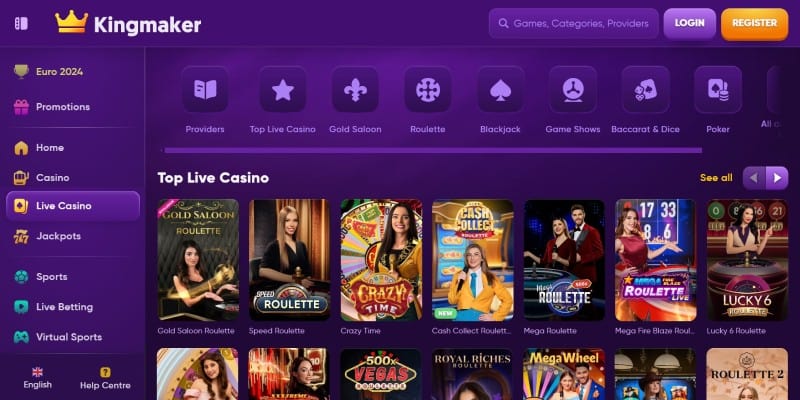
Accessing a live blackjack or baccarat table from the app seems remarkably close to sitting at a physical casino. The video feed adapts its bitrate dynamically, so you hardly ever suffer from frozen frames even on a 4G connection. We appreciated the ability to tip the dealer and chat with other players directly from the in-game interface, which retains the social element many desktop users appreciate.
Payment Section and Rapid Withdrawals
The cashier section is crafted for mobile efficiency. You can deposit using POLi, credit cards, or e-wallets in just a few taps, and the app stores your preferred method for future transactions. Withdrawal requests are processed through the same interface, and we observed that verification documents can be uploaded directly from your phone’s camera roll, speeding up the know-your-customer process.
Push Alerts and Safe Gambling Features
Push notifications are optional and can be adjusted to your liking. You might choose to receive alerts only for withdrawal confirmations and weekly tournament invites, silencing promotional messages. The app also bakes responsible gaming tools into the main menu. Deposit limits, session time reminders, and self-exclusion options are accessible without navigating layers of menus, which we believe is a responsible design choice.
Reasons to Pick the Kingmaker Casino Mobile App?
Playing through a mobile browser functions, but the dedicated Kingmaker Casino app provides a visibly smoother experience. We noticed quicker menu navigation, smoother animations, and fewer interruptions during live dealer streams. The app also allows you to stay logged in securely, so you can jump back into your favorite pokies or table games in seconds without retyping credentials each time you open a new tab.
Aside from convenience, the app grants access to push notifications that keep you informed about new game releases, tournament starts, and time-sensitive promotions. Since the interface is designed for touchscreens from the ground up, mis-taps are infrequent and the bet slip appears responsive. For anyone who gambles often on a phone or tablet, the app comes across as the way Kingmaker Casino was meant to be experienced.
Immediate Access to Games
Once the app is installed and you sign in, your lobby starts almost immediately. We recorded cold-start times of around three to five seconds on mid-range devices, which is on par with leading entertainment apps. The game tiles are buffered intelligently, so even on a weak mobile connection the lobby stays browsable while individual titles load in the background.
Optimized Touch Controls
Slots spin with a single tap, and table game chips can be moved without the lag that sometimes plagues mobile websites. We noticed that the app automatically modifies button sizes based on screen resolution, so players with larger fingers will not accidentally trigger the wrong bet amount. This type of polish reduces costly mistakes during fast-paced rounds of blackjack or roulette.
Exclusive App-Only Perks
While the core gaming catalogue matches the desktop site, Kingmaker Casino occasionally gives app users with targeted bonuses https://kingmakercasino.eu/en-au2/app2/. These can feature free spins on featured pokies, cashback offers, or entry into app-exclusive leaderboard challenges. Since the app identifies your device, accessing these perks usually demands just one tap, with no need to look for a promo code.
Compatible Devices and System Specifications
Prior to downloading, verify that your device fulfills the minimum specs. We evaluated the Kingmaker Casino app across a range of Android smartphones and iPhones frequently used across Australia, and the compatibility list is broad. However, older hardware may still run the app but might encounter slower animations or longer loading times throughout live dealer games.
The development team has clearly prioritised stability instead of flashy graphics. There is no need for a flagship device from the last year to experience a smooth session. Below we outline the recommended operating system versions and the experience from each platform.
Android Compatibility
For Android users, the app works best on version 9.0 (Pie) and above. We set it up successfully on devices running Android 10 through 14 with no crashes. The APK file is lightweight, typically under 80 MB, so it won’t eat up your storage. We also verified that the app scales correctly on popular Samsung Galaxy, Google Pixel, and Oppo handsets found in Australia.
- Android 9.0 or later recommended
- Minimum 2 GB of RAM for smooth live dealer streaming
- Operates on both Wi-Fi and 4G/5G mobile networks
- Supports landscape and portrait orientation automatically
iOS Compatibility
For Apple devices, the app demands iOS 13.0 or newer. We used it on an iPhone 8, iPhone 12, and the latest iPhone 15 Pro Max, and the experience was consistently fluid. iPad users should note that the interface adapts to the larger canvas without distorting game graphics. Since the app follows Apple’s strict performance guidelines, battery drain is minimised during extended play.
- iOS 13.0 or later
- Tuned for iPhone SE (2nd generation) and newer
- Full iPad compatibility with split-view support
- Face ID and Touch ID login supported
Tablet and Foldable Support
We were particularly impressed by how the app supports foldable phones and tablets. Using a Samsung Galaxy Z Fold, the lobby reorganises itself into a two-column view upon unfolding the device, offering you more real estate to browse game categories. Tablets on either Android or iOS benefit from larger card designs in table games, making placing side bets far easier than on a phone screen.
In-App Performance and Data Usage
Performance is the point where the Kingmaker Casino app outperforms a browser tab. We observed frame rates, memory consumption, and network activity across multiple sessions of slots, blackjack, and live roulette. The app reliably delivered stable gameplay, even when we intentionally switched between Wi-Fi and 4G mid-game. That sort of resilience is important when you are on a train or in a café with fluctuating signal.
Graphics are rendered natively, which implies the GPU on your phone handles the heavy lifting rather than relying on a web view. This translates into buttery-smooth reel spins and card deals. We also noticed that the app preloads the most frequently played games in the background, so your top three pokies launch almost instantly after the lobby appears.
Loading Times and Reactivity
We clocked the app’s cold launch on a mid-range Android device with a Qualcomm Snapdragon 695 processor. The lobby loaded in 3.8 seconds on average, and loading a popular video slot like a 5-reel Egyptian-themed game took an additional 2.1 seconds. On iOS, the numbers were comparable, with the iPhone 12 loading the same slot in just under two seconds after the lobby was ready.
Data Consumption on Mobile Networks
If you play on a limited mobile data plan, you will be happy to know the app is frugal. During a 30-minute session mixing slots and live blackjack, we recorded approximately 45 MB of data usage. Live dealer games require more bandwidth due to the video stream, averaging around 120 MB per hour on medium quality. The app enables you to toggle video quality in the settings, so you can cap usage when needed.
Energy and Storage Optimisation

After a one-hour session with the screen at 50% brightness, an iPhone 13 lost 14% battery, which is similar with streaming video. The app honours background activity limits, so it will not drain your battery when minimised. Storage-wise, the core app takes up roughly 75 MB, though cached game assets can grow to around 300 MB over time. A clear-cache button in the settings maintains this in check.
Ways to Install and Set Up the Kingmaker Casino App
Getting the app onto your device is a simple process, but it differs between Android and iOS. Since gambling apps aren’t always distributed through mainstream stores in every region, Kingmaker Casino provides direct download options that are safe and simple. We’ll guide you through each method step by step so you can get playing within minutes.
Before you begin, be certain you are visiting the official Kingmaker Casino website from your mobile browser. Avoid third-party APK repositories or unfamiliar links, as these could expose you to outdated or tampered versions of the app. The official page consistently presents the latest build and will detect your operating system.
Android APK Download and Sideloading
Android users need to sideload the app because real-money gambling applications are blocked on the Google Play Store in Australia. This sounds technical, but it involves a quick one-time permission change. further information We carried out the process on a Samsung Galaxy A54 and a Pixel 7a, and both were set to play in under two minutes.
- Navigate to the primary Kingmaker Casino mobile portal and click the “Download for Android” option.
- Your phone might notify you concerning unknown sources. Open Settings, then “Apps” or “Security,” and activate “Install unknown apps” for your web browser.
- Once the APK file finishes downloading, click it and adhere to the on-screen directions to install.
- After setup, you can deactivate the unknown sources access if you wish.
- Open the app, log in or register, and your game lobby will show up.
iOS Installation via App Store or Web Clip
For iPhone and iPad users, the scenario is less uniform. In some cases Kingmaker Casino provides a native iOS app that can be obtained directly from the Apple App Store. If a full app is missing in your area, the casino delivers a progressive web app (PWA) alternative that you can add to your home screen. Both approaches deliver a near-identical experience.
- Visit the primary mobile page on your iOS gadget and search for the “Download on the App Store” link. If available, tap it and install as standard.
- If only the web app alternative is displayed, press the share symbol in Safari and select “Add to Home Screen.”
- Name the shortcut “Kingmaker” and press Add. An app icon will appear on your home screen.
- Access the icon, authenticate, and the full-screen interface will load without browser bars.
Checking Your Installation
When the app is installed, we advise completing a fast verification step. Open the app and confirm that the version number shown in the settings menu aligns with the one posted on the official download page. This verifies you have the latest security patches and game updates. If the numbers do not match, return to the website and redo the installation to overwrite the older build.
Troubleshooting Common Installation Issues
Most installations proceed without a hitch, but a handful of situations can stump new users. We have gathered the issues we met during our testing and the fixes that worked every time. If you encounter a problem not listed here, the Kingmaker Casino support team is available directly through the mobile website’s live chat, which functions around the clock.
Remember that having your device’s operating system up to date resolves many compatibility glitches before they show up. We also advise restarting your phone after installing the app for the first time, as this eliminates any temporary files that might disrupt with the initial game asset download.
- “App not installed” error on Android: This typically means you have an older version of the app partially installed. Go to Settings > Apps, uninstall any previous Kingmaker entry, then retry.
- iOS web app icon not opening: Delete the home screen shortcut, clear Safari’s website data, and re-add the icon. This renews the cache that may have become corrupted.
- Games stuck on loading screen: Check that your device’s time and date are set to automatic. A mismatched clock can break the secure connection to the game server.
- Login credentials not saving: Enable biometric login in the app settings. If the issue continues, reinstall the app and grant the requested permissions on first launch.
Variations Between the App and the Desktop Site
If you have only ever played Kingmaker Casino on a laptop, the app will feel known but markedly more straightforward. The game library is identical in terms of titles and RTP settings, but the way you communicate with them shifts. The app removes browser chrome, giving each pixel of your screen to the casino floor. This is particularly useful on smaller phones where every millimetre counts.
Another crucial difference is offline readiness. While you yet need an internet connection to play real-money games, the app caches your account preferences, game rules, and help files on-device. This means you can view the paytable of a slot or examine the terms of a promotion even when you are briefly without signal. The desktop site does not offer that adaptability.
We also noticed that the app handles session persistence more elegantly. If you close the app mid-spin, it will bring back your exact state upon relaunch, provided the game round has concluded on the server. On a desktop browser, a page refresh often sends you back to the lobby. For players who often switch between tasks, this continuity is a true advantage.
FAQ
Does the Kingmaker Casino app free to download?
Indeed, the app is totally free. It costs nothing to download the APK for Android or to install the iOS version from the App Store or as a home screen web app. You only pay when you decide to deposit funds into your player account to wager on real-money games.
Is it possible to use the same account on the app and desktop?
Absolutely. Your Kingmaker Casino account works across all platforms without problems. Every fund, bonuses, and loyalty points you accumulate on the app are immediately accessible when you log in from a computer, and conversely. Just use the same email and password combination on each device.
Does the app work on older iPads?
It functions on iPads running iOS 13 or later, covering the iPad Air 2 and newer models. Should your iPad be unable to update beyond iOS 12, you may still access the mobile-optimised website through Safari. The web version maintains most features, though performance may be slightly reduced on very old hardware.
How can I update the Android app when a new version is released?
The app will alert you when an update is available. Tap the notification and you will be redirected to the official download page. Get the newest APK and install it over the existing version. Your login details and preferences are preserved, so you won’t have to reconfigure anything.
Is live dealer streaming quality configurable in the app?
Yes. Inside any live dealer game, click the settings icon and you will discover video quality options ranging from low to high. Decreasing the quality cuts data consumption, which proves useful if you’re on a limited mobile plan or experiencing a weak connection. The stream will automatically adjust when you leave it on auto mode.
What can I do if the app crashes during a game round?
No need to worry. All game outcomes are determined on the server, so a crash on your device has no effect on the result. Restart the app and the game will pick up in the exact state it was in. If a bet has been placed, it will be settled normally and any winnings will appear in your balance.
Are my payment details safe inside the app?
Absolutely. The app protects all communication using industry-standard TLS protocols. You are also able to enable biometric authentication so that even when someone else has your phone, they cannot access the cashier without your fingerprint or face. Kingmaker Casino never stores full card numbers on the device itself.